
What the Rail Edition adds
For intermodal cargo, the marine CY cut is only half the picture - the container also has to make a rail cut-off at the inland ramp. The Rail Edition puts the rail leg next to the marine leg in one report, so you can see the rail receiving window and how much buffer you have before the marine deadline. One email covers all your ports.
Setting up a rail subscription
Go to Settings -> Rail Subscriptions and click Add subscription. Then:
- Mode - choose how the rail leg is sourced:
- Lane (US) - the rail receiving dates are derived for your inland lane.
- Grid (Canada) - the railroad's published grid is used.
- Port - for Lane mode, enter the port UN/LOCODE (for example USORF) and port name; for Grid mode, choose the port from the list.
- Railroads - pick the railroads you move on: CN, CPKC, UP, BNSF, CSX, NS.
- Inland origins - for Lane mode, choose the inland origin metros (for example Chicago, Memphis, Kansas City); for Grid mode, choose the origin ramps.
- Destination metro - the destination for the lane (for example Norfolk).
- Time zone - the time zone the report times are shown in (with an optional separate origin-ramp time zone).
Click Add subscription. You can edit or remove any subscription later from the same page.
Reading a rail row
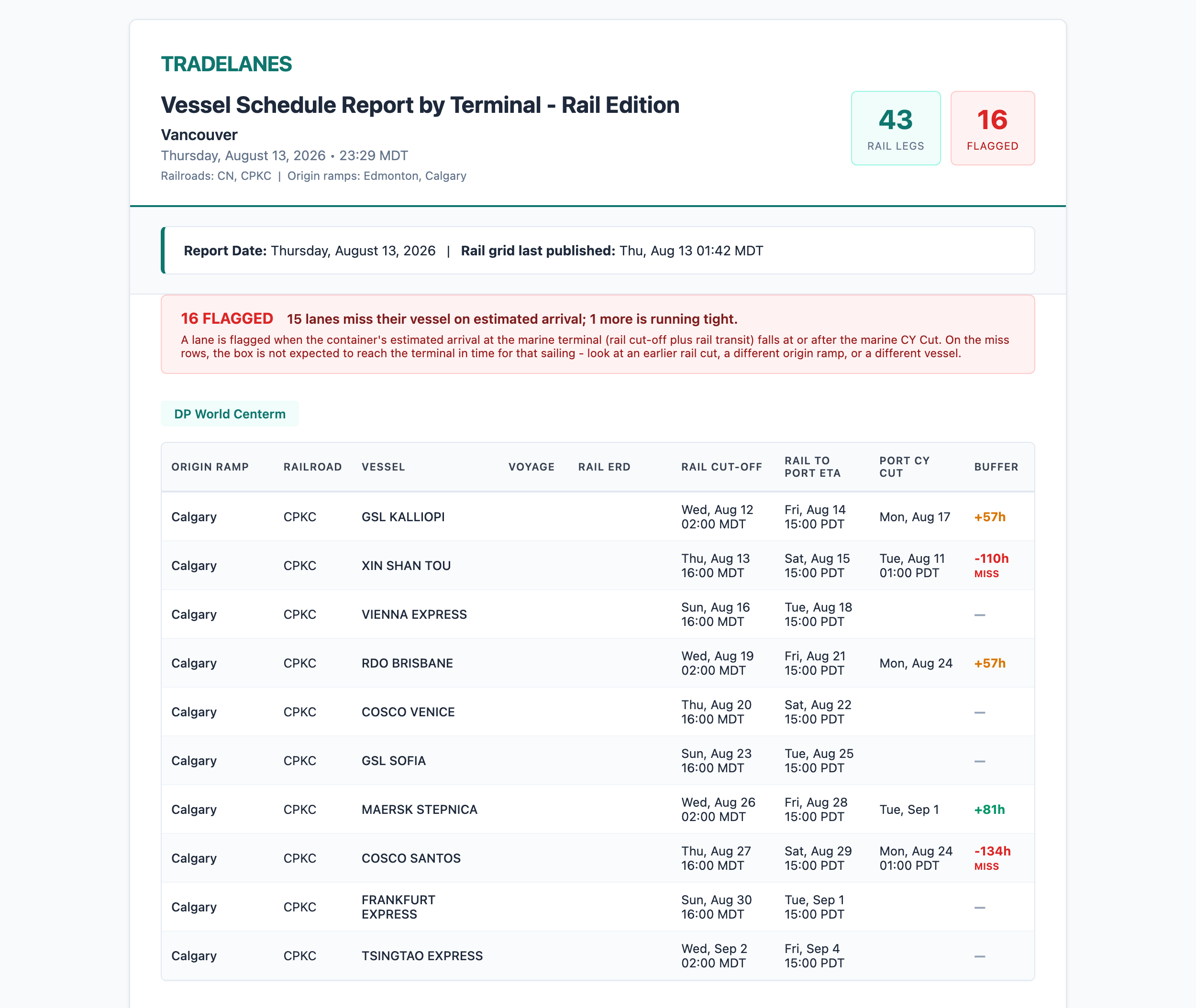
Each row in the Rail Edition shows:
- Origin Ramp and Railroad - where the container rails from, and on which line.
- Vessel and Voyage - the ocean move it connects to.
- Rail ERD and Rail Cut-off - when the ramp starts receiving, and the rail deadline.
- Rail to Port ETA - when the container is expected to reach the marine terminal (rail cut-off plus rail transit).
- Port CY Cut - the ocean-side deadline at the port.
- Buffer - the gap between the container's estimated arrival at the port and the Port CY Cut. A small buffer is tight; a negative buffer is flagged MISS, meaning the box is not expected to reach the terminal in time for that sailing.
A summary at the top counts the flagged rows (misses plus tight lanes), so you can see at a glance how many need attention. On a MISS row, look at an earlier rail cut, a different origin ramp, or a different vessel.
What to do with it
- Work the tight-buffer rows first. Where the buffer is small, the container has little slack to make the vessel - prioritize those dispatches.
- Use the rail cut, not just the marine cut, as your inland deadline on these lanes - the rail cut-off closes earlier.
Coverage
The Rail Edition covers the ports, railroads, and lanes you subscribe to. If a lane or ramp you need is not available yet, contact your TradeLanes contact and we will tell you where it stands.